


What’s going on with these redesigns?
There seems to be a movement afoot to declutter news websites’ home pages. Problem is, it makes them harder to read and, thus, harder to navigate.
I noticed it first several weeks ago with Bloomberg.com’s redesign, which I really dislike. The most visible change is the black and orange that dominated the site in a nod to its cash-cow terminals. It’s now white. Not a fan, but whatever. The bigger problem is the home page, which on my laptop looks like this:
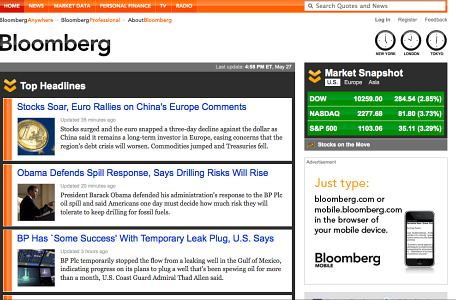
If I click over to Bloomberg to see what’s up, I get three stories “above the fold.” Before the redesign, I got at least eight or ten. Now you have to scroll down to see them. And you have to do a lot of scrolling because Bloomberg has jumbofied these headlines and subheds.
Bloomberg’s most-recent design just gave you its often quirky headlines. It now gives you jumbo headlines and quite a bit of the lede, which is pretty pointless since it’s mostly redundant.
Stocks Soar, Euro Rallies on China’s Europe Comments
Stocks surged and the euro snapped a three-day decline against the dollar as China said it remains a long-term investor in Europe…
And:
Obama Defends Spill Response, Says Drilling Risks Will Rise
President Barack Obama defended his administration’s response to the BP Plc oil spill and said Americans one day must decide how much risk they will tolerate to keep drilling for fossil fuels.
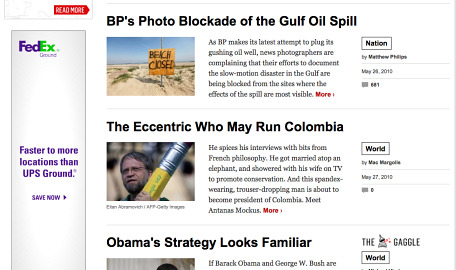
Newsweek just unveiled its redesigned site and it’s even worse. It’s got one big story above the fold, and that’s it. Oh, there are actually three more stories linked up top, but I didn’t even notice them the first couple of times I visited the site:

Scroll down and you’re lucky to get three headlines on your screen at once. Seriously, Newsweek’s site now looks more like the Reader’s Digest Large-Print Edition 2.0 than anything else. These headlines are huuuge, Tiny E!
Who’s really going to be scrolling down that much? Think I’m just being cranky? Go read Jakob Nielsen, who’s the expert on this stuff:
Web users spend 80% of their time looking at information above the page fold. Although users do scroll, they allocate only 20% of their attention below the fold…
Finally, it’s not just big media doing this. The startup Bay Citizen also goes with this simplified layout. It gives two stories above the fold on my screen:

Again, I’m far from a design expert. But this stuff seems intuitive. Don’t you want to give readers more to read on the page they’re actually going to read?
I’ll be the first to acknowledge that I’m an extreme consumer by profession (as well as nature). I want a lot of information easily accessible right away. It’s frustrating when you make it harder to find. It sure isn’t going to make me want to read more of your stuff.
The amazing thing about Bloomberg.com is that its iPad app is awesome. Probably the best news app I’ve seen. Why can’t it emulate that on the Web?
Perhaps they A/B tested these designs and found that they actually lead to more positive conversions than the previous ones?
#1 Posted by Brad Flora, CJR on Thu 27 May 2010 at 10:06 PM
I really dig the design of Newsweek's new site, but I'm totally with you on the layout. There is a happy medium between the clutter of some news sites, and the over simplistic designs here.
#2 Posted by Solomon Kleinsmith, CJR on Thu 27 May 2010 at 11:12 PM
Hello,
I totally agree with you Ryan. I hate to increase my reading time just to be able to read the titles for the new Bloomberg !
#3 Posted by david, CJR on Fri 28 May 2010 at 02:00 AM
Completely agree with you on Bloomberg, and as a regular listener to their morning radio and evening Asian TV, I really miss the little media pop outs - replaced by full pages promoting their paid subscriptions.
#4 Posted by Albin, CJR on Fri 28 May 2010 at 08:57 AM
Where to begin? You pulled a very old statement from Nielsen. The price of interaction is much lower with a scroll. People are more likely to click when given more information about the link. The tube is more representative of real time. The tube is more conducive to RSS. The format (the blog) was invented by the geeks who build the medium, so it's not some imported traditional media model — it fits the medium. And finally, there is no damned "fold." That's a print term transferred to the Web that has no bearing whatsoever.
#5 Posted by Terry Heaton, CJR on Fri 28 May 2010 at 09:30 AM
Terry, that "very old statement from Nielsen" is from two months ago.
And I can't make much of what you're talking about tubes and whatnot, but I do know you're also wrong about the "fold." It's obvious that the most viewing of a page will be of the first screen you see. The further down you go, the less eyeballs you're going to get. That's just common sense. But if you want to see an actual eye-tracking study, see the Nielsen post I linked to. Again, see the quote from Nielsen, who oughta know.
Nobody viewing a site's home page cares about RSS. That's the whole point of RSS--to not have to go to a home page. Also, the vast majority of Web users don't use RSS and never will use it. I'd bet you most don't even know what it is.
#6 Posted by Ryan Chittum, CJR on Fri 28 May 2010 at 10:22 AM
Ryan, while I respect Nielsen I don't believe his word is always law. In the case of the Newsweek redesign, people are in fact scrolling down. The nature of the web is vertical, and the (admittedly limited currently) numbers are backing up that fact. In about a week we'll know for sure, but right now I wouldn't get so attached to the "fold".
#7 Posted by Michael Robinson, CJR on Fri 28 May 2010 at 11:37 AM
A lot of what Jacob Nielsen says is based off of user patterns from ten years ago. It totally discounts Gen Y, which has grown up with the Web.
Recent studies show that scrolling does work IF the page is designed to encourage scrolling - meaning the content flows and isn't interrupted by ads, carousels, etc.
#8 Posted by John Scott, CJR on Fri 28 May 2010 at 01:25 PM
I agree with you on Bloomberg.
I HATE the new home!
IMO, the old homesite wasn't cluttered. And it was easy to navigate around.
Compared to the WSJ, the old Bloomberg site was considered flashy by some but only because the WSJ's looks likean early 1970's version. So BORING!
The good news is you can still get the "Old" Bloomberg site.
Go to the very bottom of the new home and click to retrieve it.
Then give the designers your feedback.
I truly love Bloomberg. I visit it daily.
OTOH, I NEVER visit Newsweek's home.
#9 Posted by Lex Wadelski, CJR on Fri 28 May 2010 at 04:24 PM
Ah, Lex! Thanks so much for pointing that out!
I will be using that one and hoping they don't kill that feature anytime soon!
#10 Posted by Ryan Chittum, CJR on Fri 28 May 2010 at 05:23 PM
Since "the fold" varies monitor by monitor (and technically doesn't even exist in the web world), and history shows us that standard monitor sizes and resolutions increase over time - going with an overly simplified design actually makes a good bit of sense.
Add to that the fact that the majority of users on the web are scanners, not readers, "giving readers more to read on the page they’re actually going to read?" is not such a great way to increase usability.
You sound like one of those people who want to make the logo bigger.
#11 Posted by Robert Ganoosh, CJR on Sun 30 May 2010 at 12:02 AM
As someone who vociferously opposed NPR’s redesign last year, I can’t throw stones in my glass house here. But…
I think you’re discounting that website traffic is shifting quickly to inbound and shared links. Destination homepages are becoming less likely for news consumers. Fewer will continue to type in “Bloomberg.com.” It makes sense that the focus should be on how content is arranged and presented to be better organized for consumers reading news after landing on the site from an inbound link.
Also, news sites are increasingly (thank goodness) being optimized for multiple browsers and mobile applications. A clunky, busy “above the fold” site makes viewing content on a small smartphone screen somewhat difficult, especially if there’s no separate mobile version.
So, while it may be different, there are some logical reasons. (Oh, and I eventually came around on NPR. I really like the new design … once I got used to it. I’ve nearly forgotten how the old one looked. Funny how that works.)
#12 Posted by Scott, CJR on Sun 30 May 2010 at 02:13 PM
>> The amazing thing about Bloomberg.com is that its iPad app is awesome. Probably the best news app I’ve seen. Why can’t it emulate that on the Web?
My theory - "too much freedom" of you could say "less is more". An app forces extraordinary limits. You can't use extra inches or even extra centimeters. There's just no room. Millimeters need to be considered.
PCs seem to encourage bad (or terrible) design. The average monitor is so large now - it seems that many designers throw away all ideas of good design. Sometimes at good.is there are graphics that must be about 25 inches wide.
What I REALLY will never understand is why sites don't give you design options via a cookie or something. Like:
= Do you want images - yes/no?
--- If yes, how big: large, medium, tiny?
= How large do you want the headers to be - large, medium?
= Do you want sub-headers - yes/no?
= Do you want summaries - yes/no?
I mean, for freaking sake - it's not paper! And the feedback would be useful for sites. Intelligent design requires a maximum amount of feedback.
For many sites - I've entirely given up on their navigation. Usually, I do one (or more) of the following.
= Never go back.
= Bookmark links at the site that I'm interested in and put them into a folder. If/when I go back I use those and avoid the homepage and the navigation. You can save a lot of time if you avoid sites wasting your time.
= Use ablock (and maybe the Stylish add-on) to remove stuff. Stylish also lets me control/edit the css.
= Subscribe to the site's rss feeds and make those my "navigation".
Aside - boy - Useit is a very ugly website. It's hideous.
http://www.useit.com/
I've seen some "done by hand" programmer blogs - but even those guys know not to use sickly greens and yellows. Sheesh.
---
Speaking of poor design... When I make a comment, I must have clicked "Remember Personal Info?" a dozen times now. And your site never does.
#13 Posted by F. Murray Rumpelstiltskin, CJR on Thu 3 Jun 2010 at 11:37 AM
Funny you mentioned all these news site re-designs, Ryan...I was just thinking the same thing.
Note that while there's a new display aesthetic (from the iPad mostly) pushing many news sites to more "cleaner" designs, it's also a bid to make them more advertiser-friendly (with more white space and ad areas).
There's a few sites that wisely allow users to retain the old-view, as @Robert mentioned above, like Bloomberg with dedicated URLs ( http://noir.bloomberg.com ), but you didn't really mention some computer display and browser details that do effect what you see "above the fold" online.
o Do you have your browser stretched to the top & bottom of your computer display? This will "lower your fold." ;)
o Have you moved your OSX Dock or Windows Start Bar to the side for more vertical display space?
o Are you using a fast, modern browser, like Opera? (Yes, there's a big difference.) This minimizes the toolbar clutter and shows you, mostly, the Web site instead of browser toolbars. (Also, a cool feature in Opera lets you move the Visual Tab bar to the left or right...for an even larger browser viewport.)
o There are browser features like ZOOM (text or full-site), that let you modifiy web sites to your taste (i.e., Opera has a handy full-site ZOOM slider at the bottom right, showing "100%" by default. Just slide the zoom slider down to 90% or 80% to make any web site, like Newsweek, more readable, in 2 seconds -- interestingly, I have a high-resolution display on my Mac here, so I've zoomed CJR up to 120% in Opera...haha).
o For easier news site navigation, consider using the FIND feature in your browser. (Command + f, or Control + f, or Edit->Find in your browser menu at the top). Start typing a couple letters and it will dim your web page and highlight exactly what your looking for, instead of having to eye-ball everything.
As @Scott mentioned about mobile site design issues, I would partially agree, as iPhones/iPads and other mobile devices proliferate...but remember that web site designers are still in a learning mode about using more "capability-detection" instead of browser-sniffing to properly handle full-site & mobile site views. Full-site viewing on mobiles by Safari on iPhones and Opera Mini on thousands of phone models have helped this, but it's complicated and varied, as better mobile site design takes shape...
Hope this helps a bit, and shows how you can control web sites a bit more to your own preferences with your browser of choice. (This is the ultra-short version explanation, but we hope to improves things for usability and web design. Faster and sooner. Stay tuned, the Web experience will improve quickly with HTML5.) ;)
#14 Posted by ktopera, CJR on Fri 15 Oct 2010 at 11:42 AM
It's tough when it comes to web page design. A lot of times companies are changing their website to be more "user friendly" and also more "search engine friendly." Sometimes those two don't go hand in hand, and when you throw profiting from advertising into the mix, sites can become even more confusing and cluttered. I think it would be best to go back to the basics, but I'm no expert.
#15 Posted by Garfield, CJR on Fri 20 May 2011 at 01:37 PM
There have definitely been a lot of bad redesigns lately. And I know it can be tough when it comes to web page design, but how can they all be bad? I mean really, just get back to the basics.
#16 Posted by Garfield, CJR on Fri 20 May 2011 at 01:42 PM